Pages

Showing posts with label apps. Show all posts

Monday, September 30, 2013

KakaoTalk

Have you heard of the hottest talk in town, KakaoTalk? It's a chat program that originated from South Korea said to be used by a lot of K-pop celebrities.

Even before KakaoTalk arrived in Malaysia, I've downloaded the application out of curiosity, having it installed in my 3rd generation iPad. KakaoTalk for iOS is optimised for smaller screens but it's compatible with iPad, so I had no problem running it.

Using KakaoTalk is quite straightforward.

Before you began, you'll be asked to register for an account if you have none. Like most mobile chatting app, you'll be asked for a mobile phone number.


Once you've opened the app, you'll be led to the Friends tab. Your friends are listed in alphabetical order. There're two types of accounts available: normal and Plus friends (those with a P beside). I shall explain about Plus friends in the later part of the post.


By clicking on one of the friend you'll be led to the Mini Profile. That's my friend Vvens.
She has a special theme installed so you see stuff crayon drawing. Otherwise most profiles display default theme.


The second tab if of course... Chats! I've set my iPad to display in Chinese but the button layouts are pretty self explanatory.

Whenever a message is received, the software makes a "Katukkk" sound.


This is the chatting screen.


Press on the smiley face (on the left) to access all sorts of dynamic emoticons (called Stickers)...


... and use them in your chats.


You can have access to some other functions by pressing the ">" button. Or simply flip from the left


Now we come to the Find Friends screen. You can find friends by KakaoTalk ID or QR codes.
Do you see Plus Friends? They're celebrities' official KakaoTalk account to send you updates on their latest promotions and music comebacks. Or they belong to businesses to tell you about their latest promotions and discounts on their goods.


There are games to play if you fancy them. Sorry I don't usually play games :(


The More screen contains everything else for KakaoTalk. Settings is my most important friend because I get to control how KakaoTalk behaves to how I like it to be.


Have fun guys! Don't forget to like KakaoTalk Malaysia FB. You can visit KakaoTalk official website to know more.


Thursday, August 1, 2013

Waze tip: How to choose an alternate route to destination

Waze

What's the hottest GPS in town? Make no mistake it's Waze. Unlike ordinary GPS, Waze is a social GPS navigation that enables you to beat traffic based on user submitted data.

To use Waze, simply head to Google Play Store (Android) or Apple Store (iOS) to download the app. Sign up for a username and password, and you're ready to go!

You'll need to turn on GPS and 3G/4G connection for Waze to function optimally since it depends on real time traffic data from road users around you.


To head towards a destination, just tap on the Waze button and tap Navigate from the menu. Everything is self exploratory and simple, right or not?


Of course there're always more than one route that leads to the same destination. Waze is an intelligent software that calculates the best routes for you, but you have a choice of which road to use. I wanna go to Bandar Utama from my house in Cheras; Waze calculates a route via Jalan Syed Putra. If I want to see which road I can take, I tap on the Routes button on the dialogue box.


Or, while navigating, I suddenly change my mind on the road I am going to take. I can open the Menu and tap on "Routes".


A list of possible routes will open. I can choose which road to use based on distance, travel time and road conditions. I have no problem with the second route if I'm not rushing but I wouldn't go for the third because the road is damn congested! This is the power of real time data.

Tap on one of the Route I want and Waze will take care of the rest :)


Waze lets you know if a route involves paying a toll as well. So choose your route beforehand if you wanna avoid tolls!

Have fun using Waze and happy driving!

Saturday, June 22, 2013

Instagram introduces 15 second video recording!

What's happening to Instagram lately? Guess not, Instagram has just introduced video recording! You can now post and view videos up to 15 seconds in the app. Videos can be paused and joined together as desired.

From Instagram blog:
Today, we’re thrilled to introduce Video on Instagram and bring you another way to share your stories. When you go to take a photo on Instagram, you’ll now see a movie camera icon. Tap it to enter video mode, where you can take up to fifteen seconds of video through the Instagram camera.

You’ll also find that we’ve added thirteen filters built specifically for video so you can keep sharing beautiful content on Instagram. When you post a video, you’ll also be able to select your favorite scene from what you’ve recorded as your cover image so your videos are beautiful even when they’re not playing.
That's right, the set of filters you can use for videos are not the same as those for photos.

As stated in the blog entry, you retain your intellectual property rights over your videos, just like your photos.

Instagram has also included a feature named Cinema to stabilise video recording, so that your video appears beautiful and professional.


Instagram with 15 second video requires version 4.0 of the app, so please head to Apple App Store or Google Play to download it now.

Sunday, June 26, 2011

LiveProfile + Jieun at KBS Immortal Song 2


Biorefresher 1: LiveProfile on iPod touch

LiveProfile on iPhone and iPod touch

Thanks to , I've started using this chat app for iOS. It's chatting time, anyone?

Biorefresher 2: DNA on Molecules app

deoxyribonucleic acid

It's the famous double helix in Molecules app. Download the app in iTunes to see beautiful molecules and protein structures.

Biorefresher 3: Jieun on KBS Immortal Song 2 episode 4


Compared to the other 5 contestants, she felt bad for damaging her group SECRET after consistently ranking last in each episode of the show. My say is...

Monday, May 30, 2011

Overlapps: 'cause we need some apps to re-love

A couple of months ago, shared this Apple apps site on Twitter.


overlapps
http://www.overlapps.com


The site has a clean outlook. One addition I'd like is showing one sentence description of the app when I hover my mouse over the icons.

It's a great site to check out for app suggestion for your iOS and Android devices.

Follow Overlapps on Twitter or like their Facebook page.

Thursday, October 28, 2010

Track events effectively with Distlr.com

I am very sure that most of you use Twitter to share the moments of your life and catch up with friends on how they're doing. And we get excited over things that come by once in a while, either it's a meeting of the minds during an event or happenings that unite us, things we show a great cause for.

Getting excited, WE TWEET! It's great sharing our minds revolving around a cause that brings us together, our timelines will never stop telling the story.

Twitter is a great way to show our passion, but what about a specialised service that helps us to keeping track of tweets centred around an event? It has been shown that number of tweets can spike up to 3200 per second around major events (normal load: 750 per second). Expecting more than 30 entries per minute, it's hard to keep track of things using Twitter search.

For this purpose, I introduce you , optimised for keeping up with event stream.

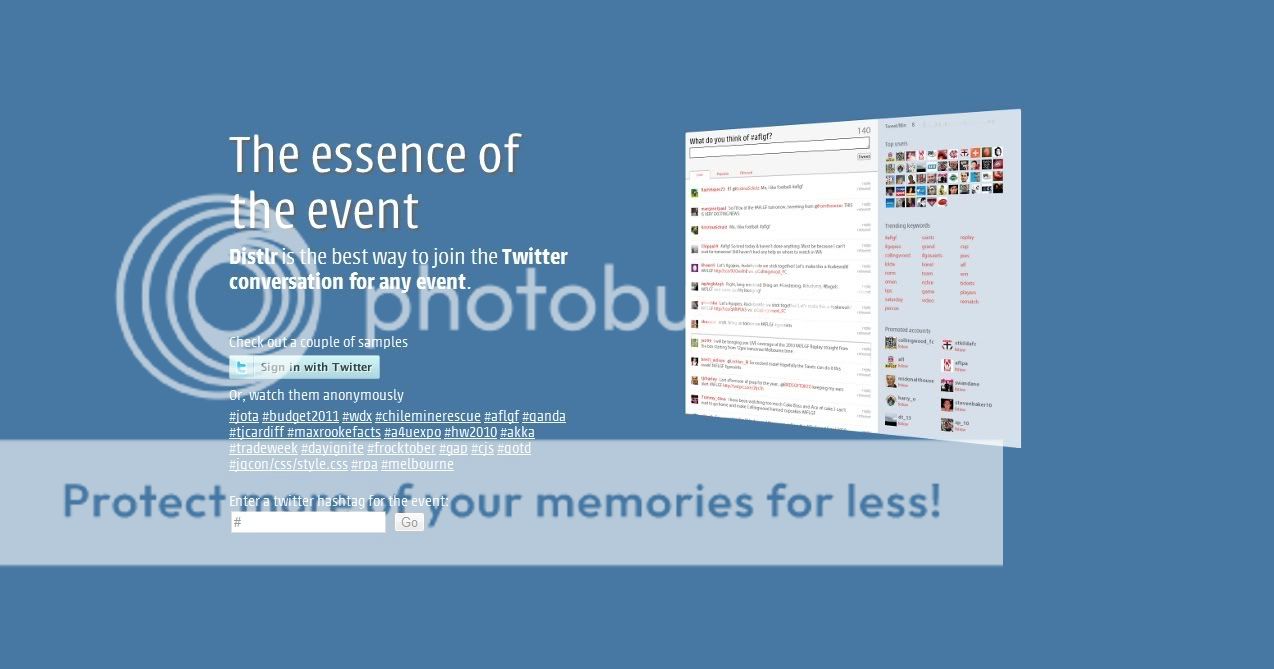
Distlr home page
The home page of Distlr.com

When you reach the home page, sign in with your Twitter account. After entering a #hashtag for an event you're interested for, you'll be directed to the live stream. The screen is pretty self exploratory, plus the feed streams and refreshes automatically.

You're free to reply and RT any entry. They're right there.

For this example, I typed #budget2011 and hit Go. What are we finding for? It's the Malaysian Government's budget for 2011.

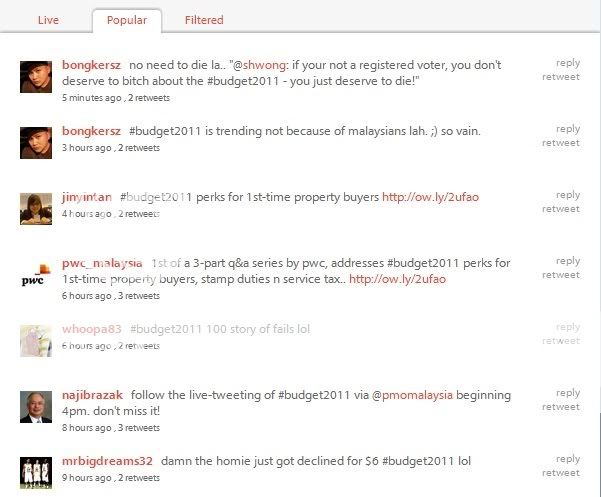
Clicking on the "Popular" tab, let's check out what are the popular retweets...

popular retweets

Number (counts) of retweets for entries is there to satisfy your crave of numbers.


If you come across an interesting person, point over their profile picture. One click and you're now following him/her! Or else, by clicking on the profile picture yield other interesting stuff. Try clicking on pictures on the stream and under "Top User", each gives different results. Try it!

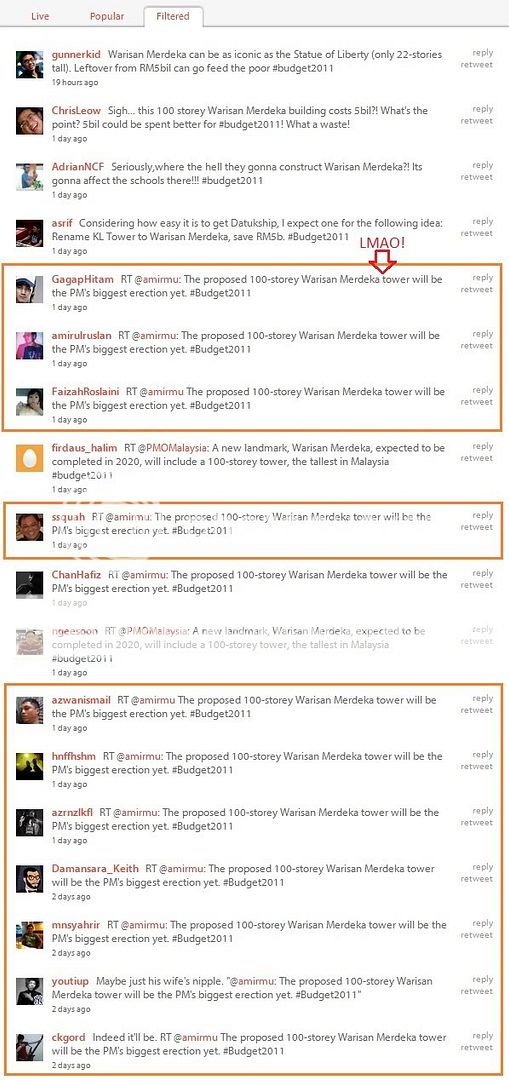
warisan merdeka 100 storey budget 2011

Too many entries coming in? You can search tweets according to *trending* keywords at the right hand column.

PM biggest erection yet

Oh-em-gee this is so funny. Here you are, a filtered stream with your keyword of interest.

Do have a try of Distlr and watch an event at your fingertips! Made in Australia.

Related post:
on Tribalytic blog

Technorati tags: , , , , ,

Friday, June 18, 2010

TweetDeck now features Foursquare!

This has been a while but for those fans out there, here's another reason to add in your arsenal of desktop applications!

TweetDeck version 0.34 now supports Foursquare.

TweetDeck Foursquare
Single-column view of Foursquare on TweetDeck

Apart from all the usual buttons, Foursquare has a map button.

Foursquare map button on TweetDeck

By clicking the map button a map is displayed. Clicking on the map button again hides the map.

Foursquare Google map on TweetDeck

With the map you can:
  • Pan the map around
  • Zoom the map in and out with the + and - button
  • Click on a profile picture to see his/her detailed location
  • Change the presentation of the map (Map, Satellite, Terrain, Hybrid) by clicking for a drop-down menu

So what are you waiting for? Download TweetDeck from their website! Make sure you have in place already!

ps. TweetDeck v0.34 supports Google Buzz as well. If you're a Buzz fan you're welcome to try it and write your own review!

Sunday, April 18, 2010

TweetDeck

Feeling stirred after looking at Jason Goh (smashpop)'s tweet on tips for new twitterers. He suggested downloading , a desktop application for twitter.

The application make use of Adobe AIR to install. It's straightfoward, and I got up and running in a few minutes.

As the first impression of the user interface, the wide window bewildered me, telling me the vastness of the world.


By default, four columns for your twitter account are displayed. What I really like is the TweetDeck recommends column. Based on your following pattern, TweetDeck generates a list of suggestions for you.

TweetDeck also features adding a list as your column - so you can choose what to focus on your few minutes worth of attention without scrolling through a mess of your friends' timeline.

What are the other cool features? Point your mouse to an avatar and you can perform a myriad of actions including replying, retweeting and direct message.


Besides Twitter, TweetDeck also works with Facebook, Myspace and LinkedIn.

TweetDeck also features a notification pop up whenever a new entry is posted. Following 100+ people is really making me feeling a fast paced world.

If you're a multitasker, TweetDeck also features a single column view. Click on the rectangles at the bottom to toggle between columns.


To say it all, TweetDeck is the coolest desktop app for Twitter! But as TweetDeck runs on Adobe AIR, make sure you download Adobe AIR from http://www.adobe.com before you do.